Iyouboushi's Home

イヨウボウシの宅

Archive for the ‘Ghost Apps’ Category

Posted by Iyouboushi on April - 15 - 2014 Comments Off on Ghost Hunting Apps – Spirit Voice Session – April 15, 2014

I almost didn’t bother to upload this one because I didn’t get hardly anything this time around.  Or at least, I should say, I didn’t hear anything.  Maybe you will have better luck.

I will say, there was some strange things going on with the source video though–lots of artifacts.  These were not caused by editing.  It’s probably coincidence, but odd.

—-
There are soooo many ghost hunting apps for phones these days. I know 99% of them are jokes but I’m wondering if there’s at least one that isn’t.  This is a test of the Spirit Voice app by Big Beard Studios: https://play.google.com/store/apps/details?id=com.bigbeard.spiritvoice


Do I believe that this app really allows ghosts to talk? I don’t know.  I’m partially convinced that my mind is just just “hearing” words out of the phonic noises.  But I’ll probably try this app a few more times in the future before casting a final judgement.

Categories: Ghost Apps, Reviews, Videos, Youtube
Posted by Iyouboushi on April - 12 - 2014 Comments Off on Ghost Hunting Apps – Echovox – April 12, 2014

I debated whether or not I should actually post this video.  I didn’t get as many good results as I had in the previous Echovox session.  Still, I think it’s equally important to post the videos that are a bit boring with not as good results to prove that this thing doesn’t always work as good.  Plus you can see what it’s like with the settings I had used.  In any case..

Categories: Ghost Apps, Reviews, Videos, Youtube
Posted by Iyouboushi on March - 17 - 2014 Comments Off on Ghost Hunting Apps – Echovox – March 17, 2014

I’m quite surprised at the results I ended up getting this week with Echovox.  Warning, there are some moments Electronic Cigarette of foul language in this one.  It seems the spirits (or whatever it is) have potty mouths.

Categories: Ghost Apps, Reviews, Videos, Youtube
Posted by Iyouboushi on March - 11 - 2014 Comments Off on Ghost Hunting Apps – Echovox – March 11, 2014

Time to try out a different app.  This time I take a look at ECHOVOX by Big Beard Studios.  Like Spiritvoice, it’s supposed to allow spirits to communicate in real time though this time it uses the power of echo to Buy Generic Cialis Online help.  I’m still not entirely sure how echo is supposed to enhance communication but it’s at least something new and different to try out.

I will probably make more videos about this app as I keep trying it out.

Categories: Ghost Apps, Reviews, Videos, Youtube
Posted by Iyouboushi on March - 4 - 2014 Comments Off on Ghost Hunting Apps – Ghost Radar Update

There are soooo many ghost hunting apps for phones these days. I know 99% of them are jokes but I’m wondering if there’s at least one that isn’t.

This is actually an update video to a Ghost Radar video that Breezieana and I did: http://www.youtube.com/watch?v=SSv9PEfDNi4

Ghost Radar is an app by Spud Pickles: http://spudpickles.com/

As I mention in this video, this is probably the last time I will talk about Ghost Radar.  However, if anyone out there has evidence that they want to share don’t hesitate to post it as a comment.


Categories: Ghost Apps, Reviews
Posted by Iyouboushi on February - 25 - 2014 Comments Off on Spirit Voice Session #3

Well, I did a solo session of Spirit Voice.

I didn’t really hear much this time.

I’ll probably try this again again sometime but I’d really like to try EchoVox, which is supposed to be way better (and nearly everyone who tries it says it works way better and they get solid responses).  That will be my next app to try..

Categories: Ghost Apps, Reviews
Posted by Iyouboushi on October - 14 - 2013 Comments Off on Spirit Voice Session #2

Bri and I decided to do another Spirit Voice session.  This time it seemed more active or clearer.  I had it hooked up to my computer speakers so that might be why (instead of trying to hear it out of the phone like last time).

This stuff is a little freaky.  I’m still not sure if this app is actually working like a spirit box and allowing spirits to communicate or if it’s our brains hearing the blips and blurbs of phonic noise and hearing words out of the noise.  I guess this is a question for the ages as we’ll never know for sure.  All I know is that if this app is true… the spirits in this house are desperate for help which is very, very disturbing.

Categories: Ghost Apps, Reviews
Posted by Iyouboushi on October - 7 - 2013 Comments Off on Ghost App Review: Spirit Voice

The review of Ghost Detection Apps continues today with our next app, an Android app: Spirit Voice.

The Google Play Store has this to say about it:

From the creator of SpiritVox comes the long awaited VERSION 2.0 vocal generator version of the SV-1 SpiritVox software ghost box.This software plays multiple channels of random vocal samples, synthetic speech generated at random from word library along with speed control and SV-1 bendable noise.

[ . . . ]

Spirit Voice works great as a traditional “Ghost Box”. Simply blend the noise and voice channels as desired and turn the speed up to 100% (all the way left). the speech engine will work as hard as it can to try to say up to 5 words per second. This creates an excellent bed of white noise for EVP/ITC sessions and experiments.

This is software for SERIOUS paranormal researchers, I FULLY support my creations, I am easy to reach, just tweet @spiritvoxapp for direct support and to join my huge group os loyal users and followers.
SpiritVoice.jpg

First off, before I review any further, I should point out that I did cut a little bit out of the Google Play Store’s description as it also includes another mode that I am not interested in and did not test.  The reason this app caught my eye is for exactly what I posted: the “Ghost Box” aspect of it.

For those who are not in the know, a “Ghost Box” (also known as a “Frank’s Box”) is basically a device that can sweep through radio stations so fast that it’s usually nothing but static (or sometimes very, very short amounts of noise).  Allegedly ghosts can use these boxes to say words. It works a little like EVPs except instead of using the white noise on a digital voice record, it’s using the radio static and you can hear it live instead of having to go listen to a bunch of static to see if any voices came through.  They’re interesting little devices and people have gotten some really interesting results using them.  I’ve always wanted to try one but they’re a little expensive (even if you know how to hack a radio you still have to buy one). This app claims to do what a Ghost Box can at a fraction of the cost.

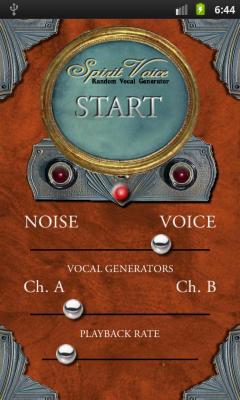
You’ll notice the app has three bars and a button to turn it on/off.  The bars are: NOISE <-> VOICE, Ch. A <-> Ch. B, and Playback rate.  The top bar, that says NOISE and VOICE, is how it generates what you hear.  If it’s set all the way to NOISE you hear nothing but white noise which might be good if you want to try to get straight and classic EVPs.  If you put it all the way over to VOICE then all you get is random noise that sounds like talking but isn’t any real words (the only way I can describe it).  If you put it in the middle then you basically get what a Ghost Box sounds like–sounds like a radio sweeping through the stations.  The second bar selects different channels of the phoenic sounding voices.  I am told that Channel A sounds like an AM radio.  The Playback rate bar is used to select how fast the phonic sounding voices occur.  If you want a true Ghost Box esque experience then you need to slide this all the way to the left, as that is the fastest speed. The slowest setting seems rather pointless to me but I’m sure there’s someone out there somewhere who has figured out a use for it.

Unlike the two joke apps that have been reviewed so far, and Ghost Radar (the app that started this obsession), I feel like this app might be legit.  For testing the app out I had it sit for a while running on the settings that I use and I didn’t hear any real words.  I heard lots of of the phonic sounding noises and the static but I never heard anything where I went “oh hey, it just said a word!”  I wasn’t asking questions during this period, I was simply testing to make sure the app would run properly on my phone.  When Bri and I sat down to actually use the app we started asking questions, pausing to allow the chance for whatever is in this room to answer.  Over the course of around 13 minutes we got a few direct responses to our questions and several instances where we didn’t.

We recorded the whole thing for Bri’s “Vlogtober 2013” set of videos, so I invite you to watch this video for yourself.  You can decide if what we heard, what we subtitled, is legit or if we’re just imagining things.  You may also be able to hear other responses that neither of us were able to hear at the time of putting the video together.

Having said that, I want to test this app more before I can conclusively say that it works or not.  On the surface I’m willing to say that it DOES work.  Wait, I should specify that it seems to work for US at least.  But we’ve also got the suspicion that we have a presence here in this room.  If you decide to try this app out and it doesn’t seem to work for you the first time, I suggest maybe trying a different location and to try again.

Cost: $10.99
Rating:  I’ll reserve my rating for a little bit until we’re done testing.

Look for more Spirit Voice videos in the future as we continue to test the app out.

Categories: Ghost Apps, Reviews
Posted by Iyouboushi on September - 17 - 2013 Comments Off on Ghost App Review: Ghost Detector Tool

It’s that time again; time for another review of a Ghost App!  This is another app for iOS and it’s called Ghost Detector Tool.  iTunes has this to say:

The spookiest app on iTunes is back with a whole new layout and many more features!This application has the ability to scan multiple frequencies for paranormal activity! We’ve incorporated EVP, EMF, and video scanning into one single app for hunting ghosts!

Simply scan areas of your house at different frequency ranges to see if you can hear anything! If you can’t pick anything up, try moving to a new area, using different frequencies, or asking questions/ giving messages to the other side. This app is best used alone!

ghost detector tool.jpeg

If the picture looks like something out of a bad Sega CD game, allow me to explain how it works.

What happens in this app is that after you turn it on it pops up with a camera that shows you what you’re looking at.  The camera’s colors can be adjusted using the spectrum and gain settings because allegedly various colors will reveal more ghosts or something.  As you scan the screen may occasionally start to turn into static to indicate a presence.  If it goes into full static mode, a picture overlay may appear (such as a skull, a face, etc) and it will say a word.

So on the outside it isn’t as complicated as Ghost Radar but it is much cheesier.  The static thing is only there to scare you, as is the picture of a skull or whatever that may pop up.  ONOZ A BAD SPIRIT!  The words are near impossible to hear even if you have the phone turned up all the way, making it pointless.  It doesn’t display the word on the screen so if you miss it then that’s it, you miss it.

If they got rid of the static and the spooky picture overlay they might be able to fool some more people.  Like the other app that we reviewed, as a joke to scare someone this might work OK (though not as good as the other since you can’t actually understand the words it spits out).  As a serious ghost hunting tool don’t even waste your time with this one.

Cost: free
Rating: 0/5 for ghost hunting, 2/5 for joking around.


Next time will be an Android app that people have claimed to have fairly good results with.  Due to the nature of this upcoming app it might be a little longer before we get a review out on it.  Look forward to it!

Categories: Ghost Apps, Reviews
Posted by Iyouboushi on August - 30 - 2013 Comments Off on Ghost App Review: Ghost Detect Pro

This is the start of a series of reviews of Ghost Apps (detection, communication and what have you).   Our interest in doing this stated with an app known as Ghost Radar that we later discovered was completely fake (thanks to the guy who decompiled the code and explained it all in full).  I was always a little on the fence about that app but it made me wonder if there’s any apps out there that are legit or not.  Bri and I will be trying various Ghost Apps on both Android and iOS.  We’re determined to find out if there’s any legit apps out there that will actually aid people in ghost hunting or spirit communication.

So let’s get started with today’s app:  Ghost Detect Pro.   It is available for iOS.  Here’s what iTunes has to say about the app:

• This app WILL scare you
• ALL the sensors on one page
• Radar that actually tracks anomalies
• Very accurate EMF (Electro Magnetic Field) detector
• Super sensitive microphone – hears every little noise
• Records audio for EVP sessions
• EVP that speaks to you, with five different voices available
• Detects vibrations and movement
• Alerts for every sensor
• Draws all this to a very accurate graph
• Quantum Flux detector
• Takes photos and detects anomalies in them – Camera can be turned off an onGraph detail info below:
• Device Sensor Readout/Graph:This will show data over time.

Graph Line Colors:
* Red = Change in magnetic field in the X axis.
* Green = Change in magnetic field in the Y axis.
* Blue = Change in magnetic field in the Z axis.
* Yellow = Change in Electro Magnetic Field Discriminator (see description below).
* White = Change in Microphone Sound Input (see description below).
* Orange = Change in the Quantum Flux, if this line is moving up or down, strange things may happen.

More detailed instructions are in the app, just touch the little blue “i” button.

ghost detect pro.jpg ghost detect pro2.jpg

As you can see, when you start the app you’re treated with a plethora of meters, numbers, radar sweeps and graphs.  It looks legit enough.  The radar sweeps through and eventually, just like Ghost Radar, finds a blip.  The blips can be different colors, just like Ghost Radar.  Eventually it might even spit out a word.

The silliest feature of this app is the ghost detection via camera part.  Randomly the app will tell you “ghost detected” and switch to the photo section so you can take a picture of it.  After a few seconds it snaps a picture and overlays some orbs or a shadowy looking figure on it.  oOoooOooOo, spooky, right?  I mean, oh snap.  Orbs!  And sometimes a shadowy figure!  IT MUST BE REAL!  Only, you can cover up the camera completely and it will still snap a picture and add the overlay of orbs/figure.  Gee, ghosts sure are thin if they can get between the camera lens and whatever you use to completely block the camera.

If they had left out the photo part perhaps it would be more convincing, but I already know from experience that the radar part is total BS and the other meters don’t seem to really read anything real.  It is true that phones (or at least some phones) can detect some EMF but they’re not really designed to act as an EMF detector.

It also seems that ghost hunting app makers just love the word quantum flux.  This is the second app I’ve seen that claims it can read and detect variations in the quantum flux.  Well, the iPhone (and Android phones for that matter) do not house any type of laser micrometer; its chronometer is not accurate to within one millionth of a second (as would be required for quantum measurement), it doesn’t have the hard memory necessary to house the highly complex calculations and mathematical theories needed to quantify any such fluctuation, and simply put it doesn’t have the ability to see quantum particles.  So yeah, keep using that word guys.

Final verdict?  As a joke app, this one is pretty good.  You could probably scare someone who isn’t in the know about it being a joke app and convince them their house is haunted (and hey, you’ll have picture proof after it snaps a pic!).  For real ghost hunting this app is rubbish and isn’t going to help you detect your way out of a paper bag..

Cost: free
Rating: 0/5 for actual ghost hunting, 5/5 for joking around.

Categories: Ghost Apps, Reviews

Featured Posts

Battle Arena 4.0 – Release

Version 4.0 has been in development for almost three full years but it’s finally ready to be officially released. As you can imagine it’s full of additions, changes and fixes. Look after the jump for the changelog and the download link. Moving forward I am not sure if I’ll continue to post “full versions” here […]

Battle Arena 3.2 – Release

It took over a year but it’s finally here! Battle Arena 3.2 is done and is now available for download.  As usual it’s chalk full of additions, changes and fixes — most of which will be listed after the jump.  Hope everyone has happy holidays.  See you in 2017.

Battle Arena version 3.2 Is Almost Done!

It’s been nine long months and Battle Arena has undergone a lot of various new additions, changes and fixes.  The final release of version 3.2 is drawing closer but still has a little ways to go.  As it stands today, here’s some of the main highlights:   ADDITIONS: Added the Supply Run type battle. In […]

Bleach 666 – EMPTY HALL OF THE PUPPET TEMPLE

Chapter 666 – EMPTY HALL OF THE PUPPET TEMPLE [Unix] [MangaStream] The chapter was released a day earlier than usual! Woohoo! Though, was it really a chapter to get excited over? Click the read more and see the summary and some thoughts (as usual).

Search my site

Twitter Updates